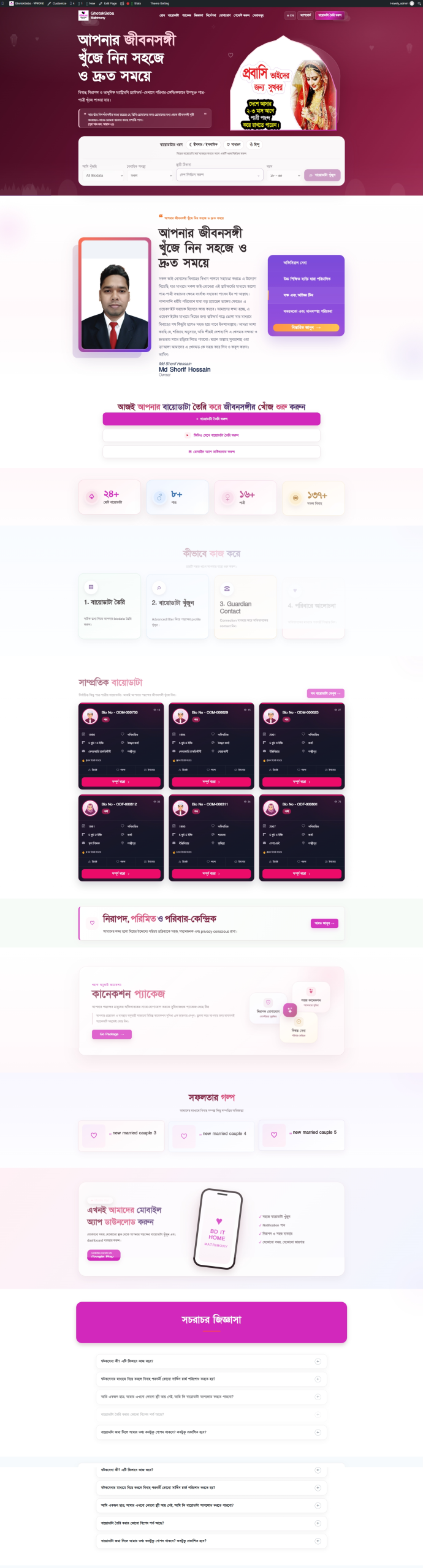
GhotokSeba is a biodata-based matrimonial website where members can create their own profiles, search for prospective brides or grooms, and use package connections to unlock a specific profile’s guardian contact details. A dedicated admin panel provides tools for managing the website.
The project includes the following features:
Member Registration and Login
Members can register and log in using a mobile number or email address. Each member has a personal dashboard.
Three Types of Biodata
The website supports Islamic/Practicing Muslim, General, and Hindu biodata. Relevant questions and information fields are displayed according to the selected category.
Detailed Biodata Creation in 10 Steps
Members can complete sections covering general information, address, education, family details, personal information, professional information, marriage-related information, expected partner preferences, declaration, and contact details.
Draft Saving and Editing
Members can save an incomplete form as a draft and finish it later. The form also displays completion progress.
Extensive Profession and Education Options
Members can select from various professions, including doctors, teachers, government and private employees, engineers, business owners, expatriates, freelancers, and students. Educational qualification options are also available.
Expected Partner Preferences
Members can describe their expectations for a prospective spouse. Multiple options can be selected for the expected partner’s marital status.
Biodata Photo Management
Photos submitted during biodata creation can be stored and managed. Administrators can also upload, replace, or remove photos. Photos appear in biodata profiles and print/PDF output according to the applicable viewing permissions.
Detailed Search and Filters
Members can search for prospective brides or grooms using biodata ID, age, country, division, district, subdistrict, education, profession, marital status, and other available criteria.
Search Result Sorting
Biodata listings can be sorted by newest, oldest, premium, most viewed, or least viewed.
Matching Profiles and Recently Active Members
Relevant profiles are displayed based on the member’s biodata category, the opposite gender, and location. Recently active members can also be viewed.
Personal Member Dashboard
Members can manage their biodata, edits, preferences, contact list, packages, notifications, and account settings from one place.
Favorites and Ignore Lists
Members can save preferred profiles to their favorites or place unwanted profiles on an ignore list. Privacy settings control whether their interest is disclosed.
Profile Views and Interest Information
The dashboard provides information about profile views and interest from registered members. Relevant privacy settings control the display of member identities.
Multiple Package Options
Category-based Starter, Popular, Premium, and Yearly packages are available. Administrators can set package prices, connection limits, and applicable conditions.
Payment Submission and Admin Verification
Members can make payments through configured bKash, Nagad, Rocket, or bank accounts and submit their transaction details. The relevant package becomes active after administrative verification and approval.
Contact Unlocking for Specific Profiles
Members can use connections from an active package to unlock a specific biodata profile’s guardian contact details. The system maintains a record of the profiles for which connections have been used.
Permission-Based Access to Private Information
Designated contact information—including names, guardian mobile numbers, relationships, email addresses, parents’ names, and full addresses—is restricted from public viewing. Duplicate addresses are avoided when permanent and present addresses are identical.
Package Tracking and Easy Purchase Access
Members can view their remaining connections, usage, and expiry details. A package purchase option is available below each biodata profile.
Biodata Printing and PDF Saving
Biodata can be printed or saved as a PDF through the browser, including the logo and information the viewer is permitted to access. A notice reminding readers to verify the information appears at the end.
ID Copying and Privacy-Aware Share Previews
Biodata IDs can be copied with one click. Share titles and previews use the website’s branding and logo. Public biodata links use profile IDs instead of phone numbers.
Notification System
Members can receive notifications about biodata approval, correction requests, and rejection. Administrators can also send notifications to individual members or selected member groups.
Administrative Biodata Management
Administrators can create and edit biodata directly. Submitted profiles can be reviewed, approved, placed on hold for corrections, or rejected with a stated reason.
Website Content and Design Controls
Administrators can manage the logo, branding text, colors, fonts, homepage content, success stories, FAQs, guides, and policy pages. Standard page content can be formatted using headings, lists, colors, and font sizes.
Mobile and Desktop Compatibility
The website’s responsive layout supports different screen sizes. Bengali and English interface switching is also available.
Google Login and SMS OTP Integration
Google login and mobile OTP verification during registration can be enabled after configuring the required Google and SMS service credentials